
SIGNUX HEC25
What soil needs measuring, and nothing more
Soil probe for moisture, conductivity and temperature, with RS485 Modbus RTU output. A 2 m cable, with a stripped end or an M10 connector.
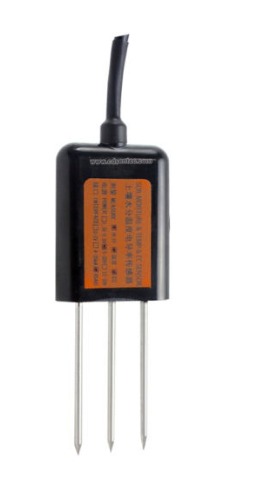
The three prongs go into the soil and measure moisture, conductivity and temperature at the same point. That is the combination a watering decision needs: how much water there is, how much salt has built up, and what temperature the soil is at.
The body is vacuum-potted in flame-retardant epoxy resin, rated IP68, and stands being buried long term without electrolysis eating the contacts. It speaks Modbus RTU over RS485, with no gateway in between.
- Measures
- Moisture · Conductivity · Temperature
- Output
- Protection
- IP68
- Operating
- −20 to +80 °C
What sets it apart
One hole, one reading
All three come from the same point and in the same Modbus frame: three consecutive registers from 0x0000. Nothing to line up between probes driven in at different depths.
Calibrated by drying and weighing
Checked against the gravimetric reference method: the sample weighed wet, then dry. And the salt content of the soil barely affects it, so it works in any kind of ground.
Made to stay put
Vacuum-potted in black flame-retardant epoxy, with IP68 that allows immersion and resistance to long-term electrolysis.
The prongs go all the way in
70 mm long and 3 mm across, and the reading needs them fully buried: if one is left in the air, the figure is worthless.
Configurations
| Cable length | Connector / output | Part number |
|---|---|---|
| 2 m | Pigtail | SX-HEC25-2M-PT |
| 2 m | M10 connector | SX-HEC25-2M-M10 |
Specifications
General
- Measured parameters
- Moisture · Conductivity · Temperature
- Family
- Direct-insertion probe
- Output
- RS485Modbus RTU
- Prongs
- 3 pcs
Soil moisture
- Range
- 0-100 %
- Resolution
- 0.1 %
- Accuracy
- ±2 %Over the 0-50 % span±3 %Over the 0-100 % span
Electrical conductivity
- Range
- 0-20000 µS/cm
- Resolution
- 10 µS/cm
- Accuracy
- ±3 %Up to 10,000 µS/cm±5 %At 20,000 µS/cm
Temperature
- Range
- −40 to +80 °C
- Resolution
- 0.1 °C
- Accuracy
- ±0.5 °C
Output and power
- Output interface
- RS485Modbus RTU protocol
- Power supply
- 5 to 30 V DC
- Maximum consumption
- 0.7 WAt a 24 V DC supply
- Factory settings
- 4800 8N1, address 1
- Baud rates supported
- 2400 · 4800 · 9600
Construction
- Ingress protection
- IP68
- Operating temperature
- −20 to +80 °CAt 0 to 80 % RH
- Sealing
- Flame-retardant epoxy resin, vacuum-potted
- Prongs
- 70 × ⌀3 mmLength by diameter
- Cable length
- 2 m
Manual
1Introduction
The HEC25 measures soil moisture, conductivity and temperature at the same point, and delivers them over RS485 in Modbus RTU.
It measures from −40 to +80 °C with an accuracy of ±0.5 °C, from 0 to 100 % moisture with ±2 % over the lower half of the scale, and from 0 to 20,000 µS/cm of conductivity with ±3 % up to 10,000.
The three prongs are vacuum-potted in flame-retardant epoxy resin, rated IP68. It is meant to stay buried, not for a single campaign.
2How to order it
The unit is always the same; what is chosen when ordering is the cable length and how it ends.
| Termination | What for |
|---|---|
| M10 connector | It plugs and unplugs without tools and without touching the terminal block |
| Bare wires | A stripped end, to go straight into a terminal block |
The cable is two metres as standard. Other lengths on request.
3Where to install it
The prongs have to go fully into the soil: if one is left in the air, the reading is worthless. Four things that change the figure more than any setting:
- •A spot with no stones, so that no prong meets anything hard.
- •Clear the top layer down to the depth the reading matters at, and push the probe vertically into the undisturbed soil below.
- •Push it in once, without rocking it side to side: a gap around the prongs falsifies the reading.
- •On a small spot, take several readings and use the average.
If the ground is hard, first drill a hole smaller in diameter than the prongs, insert the probe and compact the soil around it before measuring.
To leave it in place: dig a vertical pit more than 20 cm across, push the probe into the pit wall at the depth that matters, fill it back in firmly and let it settle. From then on it can measure and log for days or months.
Conductivity needs water to be reliable: the electrode measures the dissolved soluble ions, and below about 20 % volumetric water content the figure falls short. Over long-term monitoring, the value after watering or rain is the one closest to the true level; if a quick reading is needed, water the spot and wait for it to soak in.
4Warnings
- •The prongs have to end up completely inside the soil.
- •Do not leave it in direct sun: the body is black and can go past 50 °C. The temperature read would not be the soil’s.
- •Do not bend the prongs, do not pull it out by the cable and do not knock it about.
- •The IP68 rating allows it to be submerged.
- •Do not leave it powered up in open air for long.
5Connection
The unit comes out with four wires. Two are the supply and two are the bus:
| Wire | What it is |
|---|---|
| Brown | Positive supply, 5 to 30 V DC |
| Black | Negative supply |
| Yellow | 485-A |
| Blue | 485-B |
Mind the colour: here A is the yellow wire. If the unit answers nothing at all, the first thing to try is swapping the yellow and the blue.
With several units on the same bus, or a long cable run, bring the supply close to the unit, add an RS485 repeater and fit a 120 Ω terminating resistor at both ends.
6Reading the unit over RS485
Modbus RTU, from the factory at 4800 8N1 and at address 1. It takes 2400, 4800 and 9600.
For reading there is function 03. Function 04 returns the same thing, so either will do.
For writing there is 06, which writes one register. Eight registers accept it: the three coefficients, the three calibrations, the address and the baud rate. The five readings are read only.
6.1What can be read
| Register | PLC | What it is | Scale | Access |
|---|---|---|---|---|
| 0x0000 | 40001 | Moisture | ÷ 10 | Read only |
| 0x0001 | 40002 | Temperature, signed | ÷ 10 | Read only |
| 0x0002 | 40003 | Conductivity | — | Read only |
| 0x0003 | 40004 | Salinity, calculated | — | Read only |
| 0x0004 | 40005 | TDS, calculated | — | Read only |
| 0x0022 | 40035 | Conductance temperature coefficient | ÷ 10 | Read and write |
| 0x0023 | 40036 | Salinity coefficient | ÷ 100 | Read and write |
| 0x0024 | 40037 | TDS coefficient | ÷ 100 | Read and write |
| 0x0050 | 40081 | Temperature calibration, signed | ÷ 10 | Read and write |
| 0x0051 | 40082 | Moisture calibration, signed | ÷ 10 | Read and write |
| 0x0052 | 40083 | Conductivity calibration, signed | — | Read and write |
| 0x07D0 | 42001 | Bus address, 1 to 254 | — | Read and write |
| 0x07D1 | 42002 | Baud rate: 0 = 2400, 1 = 4800, 2 = 9600 | — | Read and write |
Temperature and the three calibrations come signed, in two’s complement: a value above 32767 is negative. FF 9B is −101, that is −10.1 °C.
6.2Frame examples
All the frames are for a unit at address 1 and already carry their CRC.
1 · Read the moisture, the temperature and the conductivity
| Frame | Direction |
|---|---|
| 01 03 00 00 00 03 05 CB | sent |
| 01 03 06 02 92 FF 9B 03 E8 D8 0F | reply |
Three registers (00 03) from 0x0000. The reply brings six bytes (06): 02 92 is 658, that is 65.8 % moisture; FF 9B is −101, that is −10.1 °C; and 03 E8 is 1000 µS/cm. Negatives come in two’s complement.
2 · Read all five readings in one go
| Frame | Direction |
|---|---|
| 01 03 00 00 00 05 85 C9 | sent |
The five readings sit together from 0x0000, so they are asked for at once: five registers (00 05). The reply brings ten data bytes (0A) in this order: moisture, temperature, conductivity, salinity and TDS. Measured on the bench at 4800, the unit takes 63 ms in the worst case to answer this request.
3 · Read the three coefficients
| Frame | Direction |
|---|---|
| 01 03 00 22 00 03 A5 C1 | sent |
The three sit together from 0x0022. From the factory they read 0, 55 and 50: temperature coefficient 0.0 %, salinity coefficient 0.55 and TDS coefficient 0.50. Measured that way on the bench unit.
4 · Change the address to 2
| Frame | Direction |
|---|---|
| 01 06 07 D0 00 02 08 86 | sent |
The address number goes in 0x07D0, from 1 to 254. We have not tried this one on the bench: the frame is put together from the register map.
5 · Set the baud rate to 9600
| Frame | Direction |
|---|---|
| 01 06 07 D1 00 02 59 46 | sent |
The baud-rate code goes in 0x07D1: 0 is 2400, 1 is 4800 and 2 is 9600. This one has not been tried on the bench either.
Documentation
Does it fit your case?
Tell us where the SX-HEC25 is going and what you need to integrate it with. We’ll tell you whether it’s the right device — and if not, which one is.